Virtual reconstructions is all the new rage – just look at us! – but Antonio and Joseba Becerro Martinez laid their first virtual bricks (or meshes) as early as 2006. By now they have created a high-quality reconstruction of the entire Acropolis.
The most remarkable fact though, is that they did this using only OpenSource software and that Antonia and Joseba share their work with the rest of the world under a Creative Commons license, basically allowing you to copy, distribute, commercialize and to even make derived works under the condition you give them their – deserved! – attribution.
Attribution — You must attribute the work in the manner specified by the author or licensor (but not in any way that suggests that they endorse you or your use of the work).
Now, how do you get your very own virtual Acropolis to work?
Read on!
Free 3D Acropolis – C’est quoi ça?
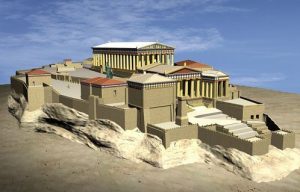 Free 3D Acropolis is a three-dimensional representation of the Acropolis of Athens as it as during the ‘Golden Age’ under Pericles’ reign, that is to say, around 413BC. Although Antonia and Joseba did their utter best to stay as close to the original as possible, some minor technical concessions had to be made: the tile roofs, using textures for the polychromes and the set-up of the scene. But despite those minor ‘flaws’, this is still one of the best – and surely the only one available freely for teaching and other use – digital models of the entire Acropolis I’ve encountered up to now! (And well, if you’re not happy with it, you can just change it.)
Loading Free 3D Acropolis in Blender
So, let’s get to it, shall we? Here is how you get Free 3D Acropolis to work:
- Install Blender – Blender is an OpenSource – shortly summarized that means free and maintained by the community – 3D Software program, that allows you to build virtual scenes and then render them from a ‘mesh’ (the lines you see) to a pretty image or even animation. Get Blender here and follow instructions.
- Install Python – Blender will check if this is necessary, and if so automatically take you to the Python download page (as I’m typing, the latest version is Python 3.1.1). Python is a programming language and installing this is perfectly safe. (As far as technology in general goes, of course.)
- Download Free 3D Acropolis – The latest release is Acro4, but keep an eye on the website to check for updates!
- Unzip acro4.zip – Put it a directory or folder that’s easy to locate, so for instance C:/acropolis.
- Load .blend file – Open Blender and then go to File > Open. Clicking the ‘ .. ‘ is one directory up. Double clicking a directory opens it. Once you’ve found your .blend files you need to select it and then press ‘Open’ (double click does not work here).
Other Options
Et voila… ! For anything beyond creating a quick render of the view you have at that time (press F12) I refer you to the Blender manuals, but surely learning how to navigate through your 3D scene is definitely a good place to start! 😉
A bit to complicated, or you just want to sit, watch and enjoy, rather than tinker with the digital model? No problem, you can get yourself an avatar an visit our King Tut Virtual, or watch this video tour through the 3D Free Parthenon. ->
Fascinated? Of course! Well, then you then might also be interested in Digital Karnak, Virtual Qumran, a Thule settlement from 1000AD, the Old Scatness Broch, Ancient Rome on Google Earth, the virtual model of the Antikythera Mechanism, Virtual Sambor Prei Kuk, … and of course our very own King Tut Virtual.
See, we’re doing our best to keep track of – and test those – virtual reconstruction innovations. Feel like we’ve overlooked one? Feel free to shout out in the comments or using the contact form, and we’ll gladly give it a try!