
General Heritage Key Questions
Heritage-key.com aims to provide the best and most up to date infomation, guides of sites or museums and photos of key ancient world or heritage sites and objects, spiced up with an immersive 3D experiences to explore the ancient world.
Heritage Key Virtual
This is perfectly normal. Please allow the program (Heritage Key VX Viewer) to start, by pressing ‘OK’ or ‘ALLOW’.
If your browser allows you to select ‘Heritage Key VX Viewer’, please do so and then select ‘OK’. If the software is not in the list, please check if you have downloaded and installed it correctly by going to the start menu and launching the Heritage Key VX Viewer from there. You can find it under:
Start Menu > Rezzable Productions Ltd > Heritage Key VX Viewer
So, you can’t connect to the Heritage-Key Virtual Grid? If you can connect from one computer or location, but not from another, the most likely problem is a firewall between your computer and the HK grid servers, blocking communication.
One of the first things to remember for communication with the Heritage-Key Virtual Grid is that most firewalls on your desktop computer or laptop will not need to be modified for the Heritage Key Viewer to be installed and used. It’s only when you have a network based firewall that you will have to change anything.
First, a site based firewall will probably only be accessible to your IT department, since firewall maintenance can be complicated. The nature of the HK Virtual Grid is that you do not need to open inbound TCP or UDP ports. Servers use a request/response system to communicate, meaning that the client requests data, and that the HK Virtual Grid responds with answering data.
You will need to open outbound ports:
53(UDP/TCP)
80(TCP)
443(TCP)
5060(UDP/TCP)
5062(UDP/TCP)
10000-10100(UDP/TCP)
12000-15000(UDP)
13000-13050(UDP)
10990(UDP/TCP)
12035(UDP)
12043(UDP/TCP)
21002(TCP)
29000(UDP/TCP)
Due to the fact that there exists hundreds of firewall solutions, we cannot list all of specific methods for updating your system here. If you need more information, please contact us at http://heritage-key.com/contact for additional help.
Msvcr71.dll is a module containing standard C library functions such as printf, memcpy, and cos. It is a part of the Microsoft C Runtime Library, rather than a .dll file that should be installed by the Heritage Key software. You can solve this by restoring the .dll file manually. A good explanation of how to do this can be found here. Do mind that you should always be careful when switching around .dll files on your computer.
Update the Microsoft .NET Framework to 3.5, then reinstall the Heritage Key software. If Msvcr71.dll is still missing, you can solve this by restoring the .dll file manually. A good explanation of how to do this can be found here.
Do mind that you should always be careful when switching around .dll files on your computer.
For optimal performance, make sure you have enough RAM (at least 1GB), a decent graphics card, and a fast enough internet connection (cable or DSL). If your computer is less than two years old, and is not a netbook, you should be fine.
If you use another operating system than Windows or Mac for your computer, you can still use a viewer of your choice – although we recommend the Imprudence Viewer – and use the following login URI to connect to the Heritage Key grid:
login.heritage-key.com
Your password is the same as the one you use to login to heritage-key.com.
Currently, access to Heritage Key Virtual is free of charge. In the future we expect to offer both free and premium areas.
If you have been to a virtual world, then this will be a familiar enough to you. Of course you won’t have any of your inventory or friends lists, but then again it will be easier to find the stuff you will collect and you will be able to make new friends.
You can’t have any of your own land and you won’t be able to buy anything either. You can gain points from various activities and competitions and then use these points to acquire merchandise. All the space on the Heritage Key grid is open to the public at this time.
You won’t be able to build anything though (sorry–yet you can go to our other grid also to make stuff if you want).
No, Heritage Key is not connected at all to Second Life service platform and has no affiliation with Linden Lab. We do however use the opensource SL Viewer which is allowed under the GPL licensing. All the content that you will see in Heritage Key Virtual is owned by Rezzable Productions Ltd or used by Rezzable under appropriate licence.
Heritage Expert
Sure! If you are a Heritage Expert that is, of course. Please use the contact form and choose ‘Heritage Experts’ from the drop down list to tell us more about you and your field of work. Make sure to include information on how best to contact you.
If you supply us with the correct and/or missing information using the contact form by choosing ‘Heritage Experts’ from the drop down menu, we’ll gladly make the necessary changes to your Heritage Expert profile. Do include the URL to the Heritage Expert profile page on heritage-key.com and information on how best to contact you.
Photos
We either invited you to become a member of our Heritage Key Flickr Group or to submit photographs to it. Using the Flickr API we are displaying photographs from our Flickr pool that we think are relevant to the subject, or that you tagged as relevant yourself. We shall always give attribution by linking back to your photograph’s Flickr page.
Further information on the Flickr API in the Flickr FAQ.
With each subject that allows user photographs to be added, you will see the text: ‘Put your Flickr photos of this location into the Heritage Key group, and tag them with heritagesite-xxx, to see them here!‘, where the heritagesite-xxx or keyobject-xxx is specific to that subject. We will then display the photograph and link back to it’s Flickr photo page. Keep into account that we can only display a limited amount of photographs at a time!
If you make use of Flickr’s Creative Commons licencing options (info) and change the license to ‘Attribution’, ‘Attribution-ShareAlike’ or ‘Attribution-NoDerivs’, we may use a larger size.
- You can change licensing for a specific photograph by going to that photograph’s Flickr page. Under ‘Additional Licensing’ you will see the current license. Click the ‘edit’ link next to that to change the license just for that specific photograph.
- You can change licensing for all photographs in a specific Flickr set by going to that set, choosing Edit > Batch Operations and then in the Flickr Organiser choose Batch Edit > Change Licensing.
- You can change the licensing for multiple photographs at once by selecting them all in the Flickr Organizer and then choosing Permissions > Change licensing.
- You can change licensing preferences on your Flickr account page. This will apply to everything you upload from now on. You can also change the license on all your existing public content in a batch if you wish.
You can easily remove your photograph from any Flickr group pool yourself. This is how you do so:
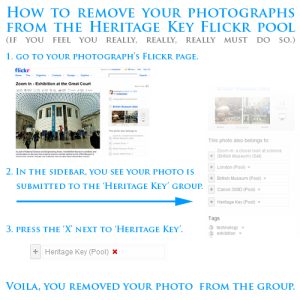
The ‘badges’ on heritage-key.com only feature photographs that are currently in the Heritage Flickr Pool, so removing your photo from the pool suffices to remove your photograph from the badge. (Sometimes it will take a few hours to update.)
If we feature your photograph on a Heritage Site, Artefact, … as lead image, you might want to contact us to remove the photo & link to your Flickr page from heritage-key.com.
To do this, please email to photo@heritage-key.com or use the contact form on heritage-key.com. Include for each photograph the following information:
- The link to the Flickr photograph page. (Not just your stream, but the pagethe photographs you wish to have removed can be found on Flickr.)
- The link to the page on heritage-key.com that features your photograph. (if possible)
By posting any photos on the Heritage Key group on Flickr, you agree to grant to Heriage Key a free, non-exclusive right to display your photos on the Heritage Key website, and on or in other Heritage Key websites at any time and for so long as we choose.
When we use your photos on a Heritage Key website, we will where reasonably appropriate attribute and link back to your Flickr photostream.
You remain the owner of copyright in your photos and are free to use them in any way you choose, subject to any other restraints.
You agree and guarantee that any photo posted on the group is your own original work, and that you own copyright in it and are entitled to make it available as set out above, and that its use will not give rise any third party claims or breach any UK laws.
You also agree with Heritage Key that your photos will meet the requirements of Yahoo’s Terms of Service. If there is any conflict between these terms and Yahoo’s Terms of Service, these terms will only apply for the uses of your photos set out above.
- Heritage Key – The Heritage Key Select’s “mother” group. Submit your photographs here if you want them to be included in Heritage Key Select.
- Heritage Key Select – The best and most impressive Ancient World photographs. Images that really do right our ancient monument’s mystique and grandeur.
- Heritage Key Virtual – Snapshots taking inside Heritage Key’s virtual world areas. You’d be surprised how real those pixels can look!
Maps
The map legend is as follows:
 |
The location of a Heritage Site. |
 |
The current location of an Artifact. |
 |
Birth location of a Personality that helped shape ancient history. |
 |
Location linked to a blog entry or Masterclass. This can be the location it is written, but is most likely to be the location it concerns. |
 |
The current location of a Heritage Expert. |
Maps require that you have JavaScript enabled. This is enabled default in most browsers, but in case you turned it off:
To enable JavaScript in Firefox 2.xx or 3.xx series
- Open Firefox.
- On the Tools menu, click Options.
- Click on the Content icon.
- Check the box next to Enable JavaScript.
- Click OK.
To enable JavaScript in Microsoft Internet Explorer 5 or Later
- Open Internet Explorer.
- On the Tools menu, click Internet Options.
- On the Security tab, click Internet.
- Click Custom Level.
- Scroll down to Active scripting.
- Click Enable (or Prompt).
- Click OK.
- Click Yes.
- Click OK.
Blogs
Of course. But we do like to know some more about you! On the contact page select ‘Blogs & Bloggers’. Tell us about yourself: what’s your field of interest? What’s your experience? Are you familiar with blogging and/or writing? What do you expect from being a blogger on Heritage Key?
Copyright
To file a copyright infringement notification with us, you will need to send a written communication to us with all of the following information in it, using this format:
- Include a statement telling us that you have found content on heritage-key.com which you believe infringes your copyright (for example, “I hereby confirm that I believe the image identified below infringes my copyright”).
- Tell us which country your copyright applies to.
- Supply us with the URL to where the infringing content can be found.
- Explain to us how the content infringes your copyright (e.g. you wrote this article, this is your photograph, etc.)
- Identify the type (e.g. a film, a piece of music, a book, etc.) and details (e.g. title, publisher, dates, etc.) of the copyright work which you own the rights to and which you believe has been infringed. If this information is available on the Internet, it is helpful to send us a link.
- Provide us with your contact information so that we can get in touch with you (email address is preferred).
- Let us have the contact information which we can pass on to the submitter of the content concerned, so that they can get in touch with you to resolve your complaint directly (email address is preferred).
- Include the following statement: “I have a good faith belief that use of the copyrighted work described above is not authorised by the copyright owner (or by a third party who is legally entitled to do so on behalf of the copyright owner) and is not otherwise permitted by law.”
- I swear that the information contained in this notification is accurate and that I am the copyright owner or have an exclusive right in law to bring infringement proceedings with respect to its use.
- Sign the notice. If you are providing notice by email, a scanned physical signature or a valid electronic signature will be accepted.
If you prefer to contact us via post or e-mail, you may do so here:
Rezzable Productions Ltd.
17 Willow Street
London, EC2A 4BH
United Kingdom
Email: info@heritage-key.com
Make sure you know whether the content that you have seen on YouTube infringes your copyright. If you are not sure what your rights are, or whether your copyright has been infringed, you should check with a legal adviser first. Be aware that there may be adverse legal consequences in your country if you make a false or bad faith allegation of copyright infringement by using this process.